You can not select more than 25 topics
Topics must start with a letter or number, can include dashes ('-') and can be up to 35 characters long.
2.1 KiB
2.1 KiB
Configuring the AR Camera background using a Scriptable Render Pipeline
AR Foundation supports the Universal Render Pipeline (URP) versions 7.0.0 or later. See the URP Install and Configure documentation for more details on switching to URP.
Note: Projects made using URP are not compatible with the High Definition Render Pipeline or the built-in Unity rendering pipeline. Before you start development, you must decide which render pipeline to use in your Project.
Basic URP configuration for AR Foundation
To configure URP for use with AR Foundation, follow these steps:
- In the Project's
Assetsfolder, create a new folder namedRendering.
- In the
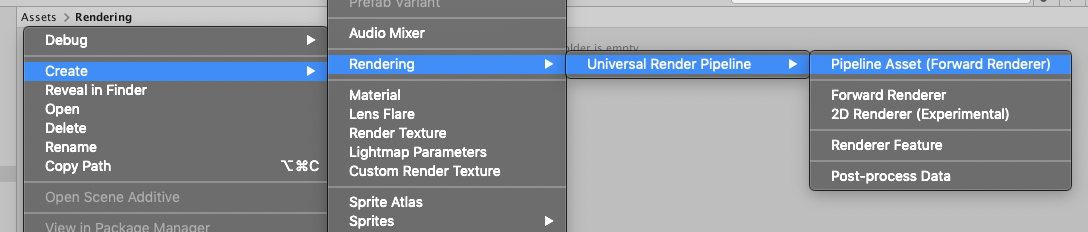
Renderingfolder, create a Pipeline Asset (Forward Renderer) for URP: Right-click anywhere in the folder and select Create > Rendering > Universal Render Pipeline > Pipeline Asset (Forward Renderer). This creates two Assets: - Select the
Forward Renderer. In its Inspector, add anARBackgroundRendererFeatureto the list of Renderer Features.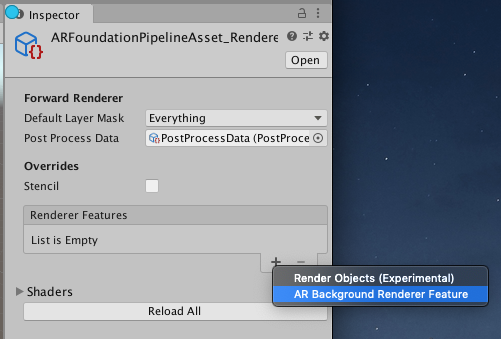
- Access the Graphics section of the Project Settings window (menu: Edit > Project Settings, then select Graphics), and select the
UniversalRenderPipelineAssetfor the Scriptable Render Pipeline Settings field.